Tiny Bots Setup Guide
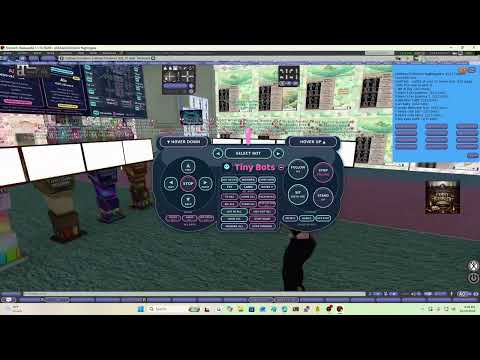
The official Tiny Bots video guide on YouTube.
In Second Life and the video will not play? Open youtu.be/32CluzAIYNc in your web browser.
Step 1: Purchase Your Package
Go to the in-world terminal at:
http://maps.secondlife.com/secondlife/Craftons%20Creations/197/75/463
Pay the terminal any amount of Linden Dollars from the avatar you use on the website: it is added to your Tiny Bots balance, and each bot's weekly fee is taken from that balance. You're charged when your bot first logs in successfully (not when you deploy it); if it never logs in, nothing is charged. Pay at least the weekly price of the package(s) you want:
- Basic - 100 L$/week
- Family - 250 L$/week
- AI - 400 L$/week
- AI+ - 1000 L$/week (everything in AI, plus deep roleplay AI and 700 hosted AI replies per week)
- AI Super+ - 2000 L$/week (everything in AI+, plus voice replies: 60 voice minutes and 1200 hosted replies per week)
Once paid, note your bot avatar name and password. You will need them for the next step.
Step 2: Log Into the Website
Go to your Tiny Bots dashboard and sign in with the account you were given (or create one if this is your first time).
Step 3: Deploy Your Bot
- On the dashboard, find the DEPLOY NEW BOT box on the right.
- Enter the bot First Name.
- Enter the bot Last Name (or Resident).
- Enter the bot Password.
- Choose your Hosting Plan from the dropdown (Basic, Family, AI, AI+ or AI Super+).
- Click DEPLOY BOT.
Your bot will appear in the list on the left.
Step 4: Log the Bot In
Click the green LOG IN button next to your bot, or use LOG IN ALL at the top.
Wait a few seconds. The status should change to Online.
Step 5: Configure Your Bot
Click your bot name to open its pages. What you can use depends on the bot's package (see SEE PRICES):
- All packages: profile picture, region greeter message, hover height, movement (forward, back, left, right, up, down, stop, fly, land, go to coordinates, follow, sit, stand) and teleport security (only you, by default)
- Family, AI and AI+: gestures and animations (play now or schedule: animations once or daily, gestures once), AO Override, Accept Inventory, Accept Animations, teleport allow list, RLV on/off, soft wander, friend and group offers
- AI and AI+: outfits, AI chat (local and IM) with your persona, group notice calendar (repeat once, daily, week days, chosen days, or a custom interval such as "every 2 weeks", "every 10 days" or "monthly" - type it or pick a number and unit, with an optional stop-after date), L$ balance and send, group inviter and auto-accept group invitations, RLV Controls page
- AI+ only: Roleplay mode, long paragraph replies, persistent memory of each avatar with editable relationship notes (Memory page). Stronger hosted roleplay model: 700 hosted replies per paid week included, then the standard local model (see Hosted AI replies & top-ups below).
Copying a group notice: on the Schedule (notices calendar) page, press Copy under any notice, then click a day on the calendar to paste it there (or Paste on the next day; Cancel ends paste mode). A form opens with everything already filled in: bot, groups, subject, text, attachment, repeat and time. Pick the day and time and press Confirm. Use + Add a day under "Also send a copy on these days" to make one copy for each of several days at once. Every copy is its own notice, so editing or removing one never changes the original. From a notice's Edit page you can also use Copy this notice to another day.
Always click Save Settings after making changes.
Step 6: Get the Free HUD (every package)
- Touch the Tiny Bots terminal and choose Get HUD. It goes to your inventory (Objects folder).
- Wear it. It pairs itself with your Tiny Bots account and stays paired when you take it off and wear it again. Your linked HUDs are listed on the HUD page.
- Tap the small – chip or the logo to shrink the HUD to an icon; tap the icon to open it again.
- Hold the HUD for 1.5 seconds for the menu (Messages, All bots, Fun).
Basic bots: they show on the HUD with the arrows (forward, back, left, right, stop) and LOG IN / LOG OUT for the selected bot. Every other button answers "Upgrade to Family to unlock this" (Outfit needs the AI package).
Family, AI and AI+ bots: the HUD controls the selected bot: log in/out, move, come here (even from another region), TP to me, follow / stop follow, sit with me (seat list), stand, wander, fly / land / hover, Dance and Hot spot. Outfit is not included: it needs the AI package.
AI and AI+ bots: Outfit, plus the ALL BOTS buttons: log in all / log out all, TP all, come all, sit all, stand all, follow all, stop follow all, wander all, swim all, outfit all, dance all and hot spots all. Only AI bots answer ALL BOTS.
The HUD allows up to 20 actions per minute.
IM Forwarding (Family, AI and AI+)
It starts off. Turn it on per bot with the IM FORWARDING box on the bot's page (its Settings link also shows the spam filter and the last 50 IMs). When someone IMs your bot, the IM pops up on your HUD with Reply, Block (blocks them on all your bots), Ignore and Not spam. Possible spam is flagged. If the HUD does not show an IM within 30 seconds, it comes to you as a normal IM, so nothing is lost. Unanswered IMs are under Messages in the hold menu.
Share Your Bots
Let a friend or partner use your bots with their own HUD. On the dashboard open SHARED ACCESS, enter their exact avatar name (or avatar key), pick all your bots or only some, and choose HUD control or HUD + website. Then tell them to touch the Tiny Bots terminal and press Get HUD. They do not need a package of their own. The HUD links to their own free Tiny Bots account by itself.
Your bot's package still decides what they can do: Basic bots only take the arrows and LOG IN / LOG OUT on a HUD, and ALL BOTS only uses AI and AI+ bots. Shared bots show as e.g. "Andrew (Trish's)". People you share with can also command the bot in chat and IM. The bot only accepts their teleport offers if you tick Bot accepts their teleport offers. Billing, L$, package, delete, persona and memory, the security settings and the sharing list always stay with you. Press Revoke to end access straight away. Everything shared users do is listed on the Shared access page. You can share with up to 20 people.
Family Roles for AI Chat (AI, AI+ and AI Super+)
On the dashboard open FAMILY. Give your family a name and a short background, then pick each bot's role (Mom, Dad, Sister, Daughter, Nanny and more, or type your own) and add optional notes such as "older sister of Lily". You can also add people who are not bots, such as your own avatar, by their Second Life name. Every bot ticked In family gets this list in its AI chat, so in roleplay it knows its place and who its relatives are. Only your own bots ever see your family. The page shows exactly what each bot sees.
Balance and Login
You're charged when your bot first logs in successfully. If the login fails (for example a wrong password), nothing is charged and the dashboard shows Login failed, check the password with a box to re-enter it. If your balance is below the first week's fee when the bot first logs in, the bot is logged out, nothing is charged and the dashboard asks you to top up.
The weekly fee is taken from your balance automatically. Top up at the terminal (CasperVend works too). If the balance is too low, the bot cannot log in and you get a low balance warning.
If a bot is disconnected (for example after a Second Life hiccup), press LOG IN again.
Voice replies (AI Super+)
- An AI Super+ bot speaks its local chat replies out loud with a voice you pick. Everyone near the bot hears it. The text reply still appears in chat. IM replies are text only.
- Turn voice on or off, pick the voice and set the volume in the Voice box on the bot's page.
- 60 voice minutes per paid week (seconds of audio actually played). The counter restarts when the weekly fee renews. When it runs out, the bot answers in text only until then.
- Common short lines play instantly; brand-new sentences may be voiced a little later or stay text only for that reply.
- Long replies are spoken up to about one minute; the rest stays text.
- Age voices: Adult Amy, Adult Ryan, Teen girl, Teen boy, Youth girl, Youth boy, Toddler girl, Toddler boy and Infant. Age voices play one ready-made clip of that age per local reply: teens and youths pick a matching line (greeting, thanks, goodbye, yes/no, laugh, …), toddlers a matching simple word or a giggle/babble, infants a baby sound matching the mood (happy coo, giggle, babble, fussy, cry, sleepy, surprised).
- Child-safe: with an age voice the bot's replies are kept family-friendly (in local chat and IM), no clip plays when a reply or the conversation is romantic, sexual or adult, and family lines such as “Love you” play only for people on your Family page. Age voices can't be picked on a bot whose persona is adult, romantic or allows explicit content.
- A voice marked “coming tonight” can't be picked yet; it becomes available as soon as its clips are uploaded.
Hosted AI replies & top-ups (AI+)
- Every AI+ bot includes 700 hosted AI replies per paid week. A reply is one answer your bot writes in local chat or IM (or a test on the Persona page) with the hosted model. Memory note updates are free.
- Choose your hosted model on the Persona page (AI+ bots only) :
- Standard – Mistral Nemo: the default, fast and good for most bots. 1 reply per answer.
- Deep Roleplay – Cydonia 24B: recommended for Roleplay mode, richer in-character writing. 1 reply per answer.
- Premium – Hermes 3 70B: our largest model. Each answer uses 3 replies (so 700 replies = about 233 Premium answers).
- Not enough replies left for your pick (e.g. 2 left and Premium needs 3)? The bot answers on Standard for 1 reply. If a hosted model is busy or down, the bot retries once on Standard and only Standard is counted; if that also fails, the local model answers and nothing is counted.
- Fair use: each bot can use up to 200 hosted replies per day; after that the local model answers until the next day (UTC). Long chat histories are trimmed automatically for hosted models.
- The counter restarts when the weekly fee renews (your paid-until date), not on a fixed weekday. Unused replies don't carry over.
- When the week's replies are used up, the bot automatically keeps chatting on the standard local model (the same one AI bots use) until the next renewal. It never stops answering.
- Want more hosted replies? On the bot's page, under Hosted AI replies, buy a pack from your L$ balance: 250 replies = 400 L$ or 600 replies = 900 L$. You confirm the price first.
- Top-up replies are used only after the weekly 700, and they never expire while the bot stays AI+.
- The bot page shows replies used and left this week, the reset date and your saved top-up replies. Only the bot's owner can buy packs.
Upgrading a Bot
You can move a bot to a higher package (Basic < Family < AI < AI+ < AI Super+) at any time without deleting it. Open the bot's page, scroll to Upgrade package, pick the package and confirm.
- You pay only the difference for the time left in your current paid week: (new weekly price - old weekly price) × days left / 7, rounded up to whole L$.
- Example: AI (400) to AI+ (1000) with 2 days left = 600 × 2 / 7 = 171.4, so 172 L$.
- Upgrading to AI+ mid-week gives the hosted AI replies for the rest of that week in the same proportion (e.g. 2 days left = 200 replies); the full 700 start at the next renewal.
- Your paid-until date does not change. From the next renewal the weekly fee is the new price.
- If the bot's paid week has already ended, there is nothing to prorate: the upgrade starts a new week at the new price.
- The bot stays online and keeps its settings, persona, memory and schedules. The new features work right away.
- The L$ comes from your balance. If it is too low, the page shows how much more you need; top up at the terminal.
- Only the bot's owner can upgrade (not people the bot is shared with). Downgrades are not available on the website.
Need Help?
Visit the Help & Contacts page or reach out on Discord (triciahenry), in Second Life (oomissoootrishoo nightingale), or by email (misstrishnightingale@gmail.com).
Disclaimer
Tiny Bots is an independent service and is not affiliated with, endorsed by, or sponsored by Linden Lab or Second Life. By using this service you agree that:
- You are solely responsible for your Second Life account and any actions taken by your bot.
- We are not liable for any account warnings, suspensions, bans, loss of inventory, or other consequences that may result from bot use.
- You must follow all Second Life Terms of Service and community standards.
- Bot hosting is provided as-is. We do not guarantee uninterrupted service or specific results.
- You're charged when your bot first logs in successfully; nothing is charged at deploy or for a bot that never logs in. Payment for packages is non-refundable once the bot has logged in successfully.
Use of this service constitutes acceptance of these terms.